You embed a YouTube video on your website and immediately wish you could turn off the autoplay, hide the related videos, or start the clip at a specific time. The good news: you can control all of that. The less obvious news: some of the parameters you learned years ago have been deprecated, changed, or quietly stopped working. This guide covers all of it.
Here’s what we cover:
- What YouTube URL parameters are and how they work
- The full list of supported parameters with examples
- Which parameters have changed or been deprecated
- How to combine multiple parameters in one embed URL
- Advanced parameters for playlists, captions, and language
- How YouTube parameters affect analytics and tracking
We embed YouTube videos in WordPress sites constantly, and the team here has navigated every one of these changes firsthand. If you’re running a WordPress site and want help with video integration or anything else, get in touch and let’s talk.
What are YouTube URL parameters?
A YouTube URL parameter is a piece of code appended to a video URL or embed code that controls how the YouTube player behaves on your web page. Parameters let you customize the player experience without touching YouTube’s source code or using the YouTube Player API.
They appear after a question mark ? in the embed URL, and multiple parameters are chained together using an ampersand & (written as & in HTML).
Basic embed URL without parameters:
https://www.youtube.com/embed/VIDEO_IDEmbed URL with parameters:
https://www.youtube.com/embed/VIDEO_ID?autoplay=1&rel=0&controls=0Full embed code example:
<iframe width="560" height="315"
src="https://www.youtube.com/embed/VIDEO_ID?autoplay=1&rel=0"
frameborder="0"
allow="autoplay; encrypted-media"
allowfullscreen>
</iframe>
The first parameter always follows a ?. Every additional parameter follows a &. That’s the entire structural rule.
The complete YouTube parameters reference (2026)
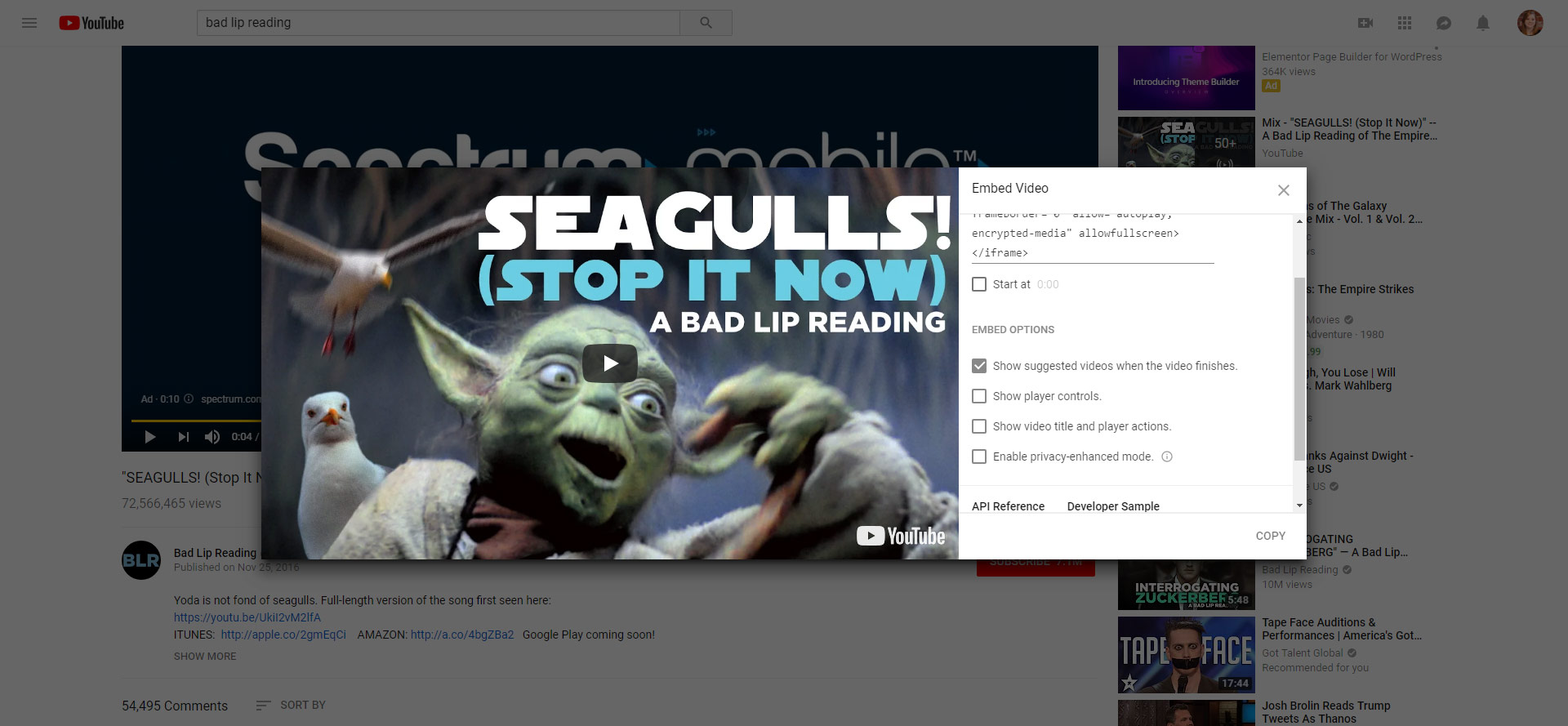
As of right now, when you choose to embed a YouTube video, you have the option of changing various settings within the embed code (see image), which are great, but there are a few more you can add — and actually, some have recently changed as YouTube continues to evolve. This is the embed code if all the provided options are unchecked:
<iframe width="560" height="315" src="https://www.youtube.com/embed/I__Dx73EaX0?rel=0&controls=0&showinfo=0" frameborder="0" allow="autoplay; encrypted-media" allowfullscreen></iframe>Playback parameters
| Parameter | Values | What it does |
|---|---|---|
| autoplay | 0 (default), 1 | Enables the autoplay parameter when the video starts playing on page load. Mute is required in most browsers |
| mute | 0 (default), 1 | Mutes the video on load. Required for autoplay to work in most mobile browsers |
| loop | 0 (default), 1 | Activates loop parameter value so the video replays once the initial video ends. Requires playlist parameter |
| start | Integer (seconds) | Video starts playing from a specific second |
| end | Integer (seconds) | Stops the video at a specific second |
| controls | 0, 1 (default), 2 | Controls player controls display. 0 hides all video player controls. 1 shows controls. 2 shows controls after a delay |
Example: Start at 30 seconds, autoplay, muted:
https://www.youtube.com/embed/VIDEO_ID?start=30&autoplay=1&mute=1Related videos and branding
| Parameter | Values | What it does |
|---|---|---|
| rel | 0, 1 (default) | Controls related videos shown after the video ends |
| modestbranding | 0 (default), 1 | Hides the YouTube logo in the video player controls bar |
| showinfo | Deprecated | Previously hid the video title. Now ignored |
| iv_load_policy | 1 (default), 3 | Controls video annotations. 3 disables annotations |
- Important change on rel: As of September 25, 2018, rel=0 no longer has the ability to disable related videos entirely. Instead, when rel=0 is set, it will show related videos from the same channel as the video being played, rather than videos from across YouTube. You cannot fully disable related videos from appearing after the initial video ends.
- Important change on showinfo: The showinfo parameter was deprecated in September 2018 and is now ignored by the YouTube player. Setting showinfo=0 to hide the video title no longer has any effect.
Playlist and queue parameters
| Parameter | Values | What it does |
|---|---|---|
| list | YouTube playlist ID | Loads an entire playlist into the player. List parameter value must be a valid YouTube playlist ID |
| listType | playlist, user_uploads | Specifies the type of content loaded. Use user_uploads to load a channel’s uploaded videos |
| playlist | Video ID(s) | Required when using loop=1. Specifies the playlist the player will play after the initial video ends. Set it to the same video ID to loop a single video |
| index | Integer | The initial video to play from a playlist |
Looping a single video correctly:
https://www.youtube.com/embed/VIDEO_ID?loop=1&playlist=VIDEO_IDSetting loop=1 without the playlist parameter will not loop a single video. The loop parameter value requires a playlist to function, even if that playlist contains just the same video.
Loading a YouTube playlist:
https://www.youtube.com/embed/VIDEO_ID?list=YOUTUBE_PLAYLIST_ID&listType=playlistCaption and language parameters
| Parameter | Values | What it does |
|---|---|---|
| cc_load_policy | 0 (default), 1 | Forces captions to display by default. 1 enables display captions even when the user has captions turned off |
| cc_lang_pref | IETF language tags | Sets the default caption track language. Example: en for English, es for Spanish, fr for French. Specifies the default language for the caption track |
| hl | IETF language tags | Sets the player’s interface language, affecting video title, player controls labels, and other text in the player. Uses IETF language tags to specify the player’s interface language |
Other language input codes are supported through IETF language tags. These respect users’ individual language preferences where available, but the cc_lang_pref and hl parameters override the default language and default caption track when set explicitly.
A different caption track language can be loaded by combining cc_load_policy=1 with your preferred cc_lang_pref value. The caption track language specified must be available for the video; the default language is used.
Example: Load English captions by default with a French player interface:
https://www.youtube.com/embed/VIDEO_ID?cc_load_policy=1&cc_lang_pref=en&hl=frInterface and behavior parameters
| Parameter | Values | What it does |
|---|---|---|
| color | red (default), white | Changes the color of the video progress bar in the player |
| disablekb | 0 (default), 1 | Disables keyboard controls. 1 disables the supported keyboard controls for the player |
| fs | 0, 1 (default) | Controls whether a toggle full screen display button appears. 0 disables the fullscreen button, preventing fullscreen playback |
| playsinline | 0, 1 | Controls whether videos play inline or in fullscreen on iOS. 1 enables videos play inline on mobile browsers |
| enablejsapi | 0 (default), 1 | Enables YouTube Player API functions and player API calls via JavaScript. Required if you want to control the player with the YouTube Player API |
| origin | Domain URL | Required when using enablejsapi=1. The origin parameter value should be set to your web page’s domain to protect against cross-origin attacks. Sets the widget provider’s domain as the origin parameter value |
Supported keyboard controls (when disablekb is not set to 1):
- Spacebar or K: Play/pause
- Left / Right arrows: Seek backward or forward 5 seconds
- Up / Down arrows: Adjust volume
- F: Toggle full screen
- Numbers 0-9: Jump to a percentage of the video
Analytics and tracking parameters
| Parameter | Values | What it does |
|---|---|---|
| widget_referrer | URL string | Identifies the actual traffic source in YouTube Analytics when the player is embedded on a third-party page. Helps ensure YouTube analytics reporting correctly attributes traffic to the widget provider’s domain rather than showing an internal YouTube page as the source |
Without widget_referrer, embedded player traffic may appear in YouTube analytics as coming from YouTube itself rather than your web page. This is particularly important for understanding the actual traffic source in your YouTube analytics reporting.
Example for accurate analytics:
https://www.youtube.com/embed/VIDEO_ID?widget_referrer=https://yourwebsite.comDeprecated parameters (no longer functional)
| Parameter | Status | Notes |
|---|---|---|
| showinfo | Deprecated Sept 2018 | Previously hid the video title and uploader. Now ignored entirely |
| autohide | Deprecated | Previously controlled whether the video title and player controls would automatically hide. No longer functional |
| theme | Deprecated | Previously allowed a light or dark player theme. No longer supported |
| iv_load_policy | Partially functional | 3 still suppresses annotations on videos that have them |
How to combine multiple parameters
Combining parameters in a single embed URL is straightforward. Start with ? after the video ID, then chain each additional parameter with & (or & in HTML).
Example combining multiple parameters:
<iframe width="560" height="315"
src="https://www.youtube.com/embed/VIDEO_ID?autoplay=1&mute=1&rel=0&controls=1&loop=1&playlist=VIDEO_ID&cc_load_policy=1&cc_lang_pref=en"
frameborder="0"
allow="autoplay; encrypted-media"
allowfullscreen>
</iframe>
This embed code will:
- Enable autoplay parameter with mute (required for autoplay in mobile browsers)
- Show related videos from the same channel only
- Display video player controls
- Loop the video using the loop parameter
- Display captions in English by default
How to use the YouTube Player API for advanced control
If you need more than static parameters, the YouTube Player API gives you full JavaScript control over the player after it loads. This enables dynamic behavior like responding to player events, making player API calls, and implementing custom UI around the video.
Basic API setup:
<!-- 1. The <div> that will contain the player -->
<div id="player"></div>

<script>
// 2. Load the YouTube IFrame Player API code asynchronously
var tag = document.createElement('script');
tag.src = "https://www.youtube.com/iframe_api";
var firstScriptTag = document.getElementsByTagName('script')[0];
firstScriptTag.parentNode.insertBefore(tag, firstScriptTag);

// 3. Create the YouTube player
var player;
function onYouTubeIframeAPIReady() {
  player = new YT.Player('player', {
    height: '315',
    width: '560',
    videoId: 'VIDEO_ID',
    playerVars: {
      'autoplay': 1,
      'controls': 0,
      'rel': 0,
      'origin': 'https://yourwebsite.com'
    },
    events: {
      'onReady': onPlayerReady,
      'onStateChange': onPlayerStateChange
    }
  });
}
</script>
Key YouTube Player API functions this enables:
- player.playVideo() — Play the current video
- player.pauseVideo() — Pause the current video
- player.stopVideo() — Stop the current video
- player.seekTo(seconds) — Jump to a specific point in the player’s video progress bar
- player.mute() / player.unMute() — Toggle audio
- player.getVideoData() — Returns the current video’s metadata
The enablejsapi=1 parameter in the iframe embed URL or the playerVars object is required before any player API calls will work.
Quick reference: parameter cheat sheet
| Use case | Parameters to use |
|---|---|
| Autoplay on load | autoplay=1&mute=1 |
| Loop a single video | loop=1&playlist=VIDEO_ID |
| Hide related videos (same channel only) | rel=0 |
| Hide player controls | controls=0 |
| Hide YouTube logo | modestbranding=1 |
| Start at a specific time | start=SECONDS |
| Enable captions | cc_load_policy=1 |
| Set caption language | cc_lang_pref=en |
| Set interface language | hl=es |
| Load a playlist | list=PLAYLIST_ID&listType=playlist |
| Enable API control | enablejsapi=1&origin=https://yourdomain.com |
| Track analytics accurately | widget_referrer=https://yourdomain.com |
| Inline playback on iOS | playsinline=1 |
What changed and when
Here’s a consolidated timeline of the most significant YouTube parameter changes that still affect embedding today:
- September 2018: rel=0 no longer fully disables related videos. Instead, it limits related videos to the same channel as the video being played.
- September 2018: showinfo parameter deprecated. Setting it to 0 to hide the video title no longer works.
- Ongoing: autohide and theme parameters are deprecated and ignored.
- Current: modestbranding=1 still hides the YouTube logo from the video player controls bar, but YouTube may update this behavior at any point.
- Current: cc_load_policy, cc_lang_pref, and hl parameters are all functional and respected by the player.
- Current: The YouTube Player API documentation was last updated April 28, 2026, confirming the parameters listed in this guide reflect current behavior.
A note on WordPress and YouTube embeds
If you’re embedding YouTube videos on a WordPress site, you have a few options for working with these parameters:
- Manual iframe embed: Paste the full iframe embed code with parameters directly into the HTML editor of a page or post.
- YouTube block in Gutenberg: The native YouTube block doesn’t expose parameter controls in the interface, but you can switch to a Custom HTML block and add a manual iframe embed with full parameter control.
- Plugin approach: Plugins like WP YouTube Lyte or similar video embedding plugins offer UI controls for common parameters without writing manual embed code.
If you’re regularly embedding video content across your WordPress site and want help making sure the implementation is clean and performing well, our WordPress development team handles exactly this kind of technical detail as part of broader site projects.
FAQs
What is a YouTube URL parameter?
A YouTube URL parameter is a code added to a YouTube embed URL that controls player behavior, such as autoplay, captions, loop, and related videos, without needing to use JavaScript.
Can I fully disable related videos with YouTube parameters?
No. As of September 2018, setting rel=0 no longer has the ability to disable related videos entirely. It limits suggested videos to the same channel as the video being played, but related videos from that channel will still appear at the end.
How do I make a YouTube video autoplay on my website?
Add autoplay=1&mute=1 to your embed URL. The mute parameter is required because most modern browsers, including Chrome and Safari on mobile browsers, block autoplaying videos with audio.
How do I loop a YouTube video?
Use loop=1&playlist=VIDEO_ID, where VIDEO_ID is the same ID as the video being embedded. The loop parameter requires the playlist parameter to function, even for a single video.
What YouTube parameters are deprecated in 2026?
The showinfo and autohide parameters are both deprecated and ignored by the YouTube player. The theme parameter is also no longer supported. Setting these in your embed URL will have no effect.
How do I track YouTube embed traffic accurately in analytics?
Add widget_referrer=https://yourwebsite.com to your embed URL. This ensures YouTube analytics reporting correctly identifies your site as the actual traffic source rather than showing an internal YouTube page as the source.