

A WordPress site that isn’t actively maintained is a site that’s slowly degrading. Security vulnerabilities accumulate as plugins go unpatched. Performance drops as the database bloats with unnecessary data. Broken links frustrate visitors and send negative signals to search engines. Spam comments erode credibility. Most of this happens quietly, without any obvious warning, until something breaks or a security breach makes the problem impossible to ignore.
Proper maintenance prevents all of it. This guide covers the essential WordPress maintenance tasks every site owner should be performing, how frequently each one needs attention, and the options available for handling them efficiently.
Here’s what we cover:
- The eight essential WordPress maintenance tasks and how often to run them
- A practical maintenance checklist organized by daily, weekly, and monthly frequency
- How to use WordPress maintenance mode during major updates or site work
- Database optimization and why it matters for performance
- Security plugins, two-factor authentication, and how to keep your site secure
- Your options for handling maintenance: plugins, managed hosting, freelancers, or agencies
Freshy handles WordPress maintenance for over 2,400 clients and has been doing so since 2011. If you’d rather hand off these tasks to a professional team, get a quote today, and we’ll cover everything on this list and more.
Why WordPress maintenance is important
WordPress maintenance is important because a neglected site costs significantly more to fix than it would have cost to maintain. Security breaches require expensive remediation. Poor performance causes visitors to leave before converting. Lower search engine rankings from technical problems reduce the organic traffic your site depends on. Outdated plugins and themes create compatibility conflicts that break functionality at unpredictable moments.
Effective WordPress maintenance ensures your site remains secure, performs well, and continues to serve your visitors with a positive user experience. It also protects your investment in the site itself. A site that hasn’t received regular maintenance is harder and more expensive to fix, harder to migrate, and more likely to have accumulated technical debt that affects every future change.
The essential maintenance tasks below form the foundation of any sound maintenance checklist.
Eight essential WordPress maintenance tasks
These are the essential WordPress maintenance tasks:
1. Make regular automated backups
Regular backups are the single most important safety net your WordPress site can have. A backup is a complete copy of your site, including all files, database tables, theme settings, media uploads, and plugin configurations. Without one, any incident, whether a hack, a bad update, user error, or server failure, can result in permanent data loss.
Backup frequency by site type:
| Site type | Recommended frequency |
|---|---|
| Simple informational site | Weekly |
| Business site with regular content updates | Daily |
| E-commerce store with active orders | Daily or multiple times per day |
| Membership site with user data | Daily |
Daily backups provide extra security for frequently updated sites. Automated backups reduce the risk of human error by removing the need to remember to run them manually. Always store backups in a secure, remote location in cloud storage rather than on the same server as the live site. If the server is compromised, a backup stored there is compromised too.
Most WordPress site owners use plugins like Jetpack or UpdraftPlus to automate this process. Our WordPress backups service handles 90-day backup retention with off-site cloud storage for clients who want this managed professionally.
2. Update WordPress core, themes, and plugins
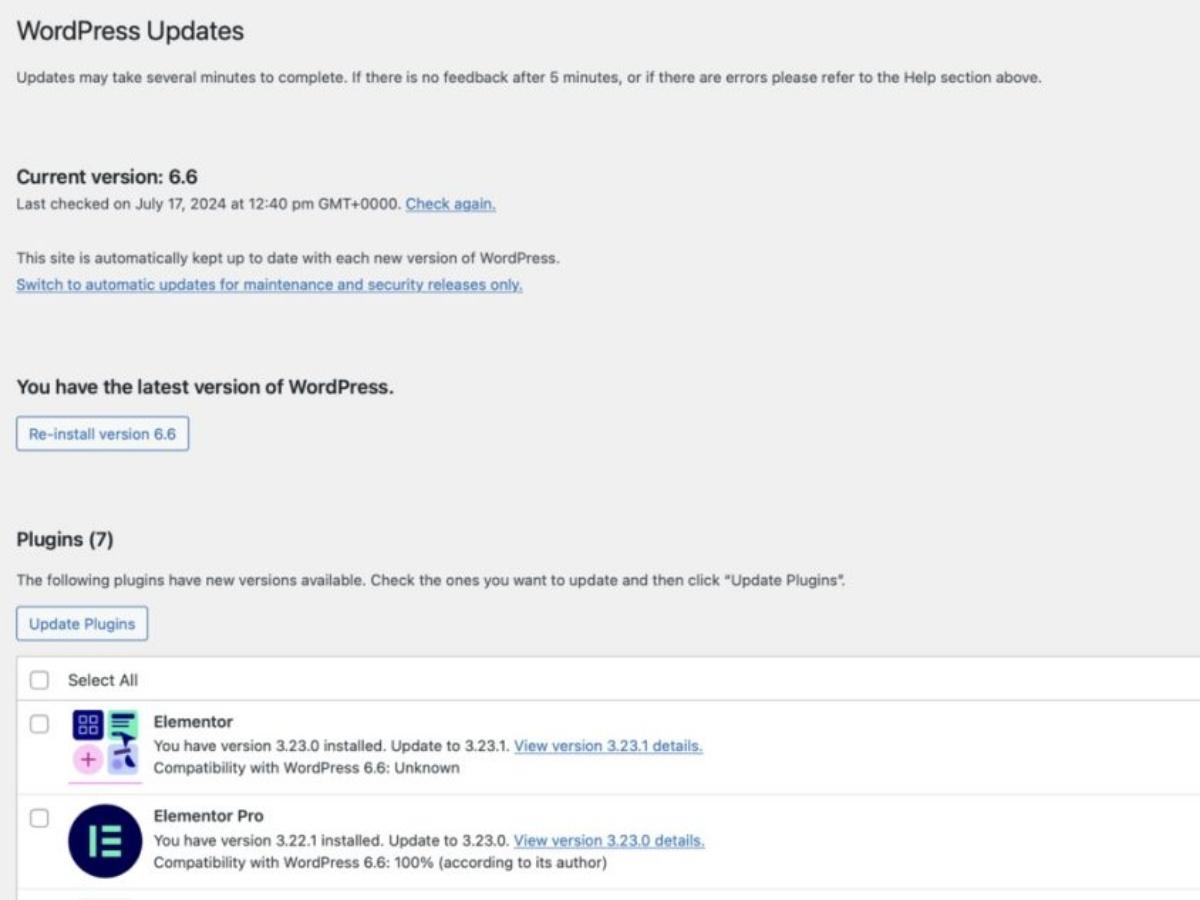
Regular updates are among the most critical routine maintenance tasks for keeping your WordPress installation secure and performing well. WordPress core updates are released every few months, while plugin and theme updates appear almost daily on active sites.
Updates serve three important functions: they patch security vulnerabilities, fix bugs that cause slow performance or broken functionality, and add new features that keep the site current with evolving web standards. Outdated themes and plugins create security vulnerabilities that attackers actively scan for and exploit.
Apply security patches within 7 days of release. Critical vulnerability patches should be applied immediately rather than waiting for a scheduled maintenance window. To avoid plugin updates breaking functionality on the live site, test significant updates in a staging environment before deploying them to production.
Navigate to Dashboard > Updates in your WordPress dashboard to review what’s available. Check this at least weekly as part of your routine maintenance schedule.
3. Check and remove spam comments
Spam comments create several problems simultaneously. They make your site look unprofessional and unmoderated. They often contain links to malicious websites that can get your site flagged by security tools. And in volume, they affect page performance and create an unpleasant experience for genuine readers.
Navigate to the Comments tab in your WordPress dashboard to review and delete suspicious content in bulk. To reduce spam volume, configure settings under Settings > Discussion to require users to be registered and logged in before commenting, and enable manual approval for all new comments. The Akismet plugin is one of the most effective tools for automatically filtering spam before it reaches your moderation queue.
4. Remove unused themes and plugins
Every plugin and theme installed on your WordPress site, whether active or inactive, represents a potential security risk. Unused plugins and themes create security weak spots because they may not receive updates, and an unpatched vulnerability in an inactive plugin can still be exploited.
Run a plugin and theme audit at least quarterly. Remove anything your site no longer needs. Look for duplicate functionality where two plugins do the same job. Identify single-use plugins that served a one-time purpose, like database migration, and remove them. For active plugins, verify that each one is genuinely earning its place by serving a function the site actually uses.
Removing unnecessary plugins also improves site performance by reducing the number of assets that need to load and the number of database queries that run on each page request.
5. Review user accounts and permissions
Every user account on your WordPress site is a potential attack vector. A review of user accounts should be part of your regular maintenance process, particularly for sites with multiple contributors, clients, or team members who have come and gone over time.
Start by verifying that every active user has been assigned the correct role with the minimum permissions necessary for their function. The WordPress roles from most to least restrictive are: Administrator, Editor, Author, Contributor, and Subscriber. Only one administrator should manage a WordPress site. Multiple administrators multiply the risk of a compromised credential, giving an attacker full site access.
Regularly audit users to minimize access and remove inactive accounts. Regularly review user accounts to remove inactive ones who haven’t logged in within a defined period. Use strong, unique passwords for all user accounts and enable two-factor authentication (discussed in the security section below) to add an additional verification layer beyond password entry.
6. Find and fix broken links
Broken links lead visitors to error pages rather than content, which damages user experience and signals to search engines that the site is poorly maintained. Broken links can increase your site’s bounce rate, negatively affect SEO rankings, and, over time, contribute to lower search engine rankings as crawlers encounter repeated errors.
Broken links accumulate naturally as external sites restructure their URLs, as internal pages are moved or deleted, and as older content references resources that no longer exist. Plugins like Broken Link Checker can automate link detection across your site, flagging problematic URLs without requiring you to manually visit every page. Address detected broken links by updating URLs where the destination still exists in a new location, or removing the link where the target content no longer exists.
7. Database optimization
Regular database optimization prevents sluggish performance over time. The WordPress database accumulates unnecessary data as the site operates: post revisions that stack up with every save, trashed posts and spam comments that aren’t permanently deleted, transient options that were never cleaned up, and orphaned data from plugins that were removed without proper cleanup.
A clean database improves query speed and site reliability. Websites should load in under 3 seconds, and database bloat is one of the contributing factors to slow query response times that push load times beyond that threshold.
Plugins like WP-Optimize or Advanced Database Cleaner handle the most common optimization tasks without requiring direct database access. For more thorough database maintenance, a developer can run cleanup queries directly through phpMyAdmin. Schedule database optimization at least monthly as part of your routine maintenance process.
8. Performance monitoring and SEO maintenance
Site performance should be monitored using analytics and page speed tools on a regular basis. Google Analytics reveals traffic patterns, bounce rates, and page-level engagement that indicate whether users are finding what they need. Google Search Console shows how search engines are indexing your site, whether crawl errors are occurring, and which pages are gaining or losing search visibility.
Caching can improve website speed and performance by serving pre-built pages to visitors rather than generating them dynamically on every request. Image optimization can significantly improve loading times for media-heavy sites. Regular performance monitoring catches these issues before they compound into more serious problems.
WordPress speed optimization and search engine optimization should both be treated as ongoing maintenance disciplines rather than one-time setup tasks.
WordPress maintenance checklist by frequency
Organizing maintenance tasks by how frequently they need to happen makes it easier to build a sustainable routine.
Daily tasks:
- Verify automated backups completed successfully
- Monitor uptime alerts
- Check for and respond to security alerts
- Review and approve or delete new comments
Weekly tasks:
- Check the WordPress dashboard for available updates
- Apply plugin, theme, and WordPress core updates (test in staging first for major updates)
- Run a broken link scan
- Review user activity logs if security plugins provide them
Monthly tasks:
- Run database optimization
- Review user accounts and remove inactive ones
- Audit installed plugins and themes, removing any that are unused
- Review Google Analytics and Google Search Console for performance and SEO trends
- Test contact forms, checkout processes, and other key functionality
- Review hosting environment health and storage usage
Quarterly tasks:
- Comprehensive security audit
- Full plugin and theme audit
- Review and update any content that has become outdated
- Test the backup restoration process to verify backups are actually functional
Documenting maintenance tasks helps track completed actions and ensures nothing is skipped in a given cycle.
Security hardening: beyond the basics
The eight tasks above cover the core maintenance checklist, but several security-specific measures deserve their own attention because they significantly reduce the risk profile of any WordPress installation.
Install security plugins and enable monitoring
Security plugins like Wordfence, Sucuri, and iThemes Security provide malware scanning, brute force attack protection, login attempt monitoring, and firewall rules that block malicious traffic before it reaches WordPress. Security monitoring protects against malware and brute-force attacks in ways that standard WordPress does not provide by default.
Install a reputable security plugin and configure its monitoring and alerting features so that you receive security alerts when suspicious activity is detected. Review these alerts promptly rather than letting them accumulate.
Our WordPress security service provides professional security monitoring, malware scanning, and incident response for sites where security is a critical business concern.
Enable two-factor authentication
Enable two-factor authentication for all administrator accounts on your WordPress site as a high-priority security measure. Two-factor authentication requires a second verification step, typically a time-sensitive code from an authenticator app, in addition to the standard username and password. This means that even if an attacker obtains valid credentials, they still cannot access the account without the second factor.
Plugins like Google Authenticator or Two Factor make this straightforward to enable from the WordPress dashboard. This single change significantly reduces the risk of unauthorized administrator access.
Use WordPress maintenance mode during major site work
When performing significant updates, redesigns, or migrations on a live site, enable WordPress maintenance mode to show visitors a professional maintenance message rather than a broken or partially updated site. Maintenance mode presents a maintenance page informing visitors that the site is temporarily unavailable while work is underway.
A maintenance mode plugin like WP Maintenance Mode or the built-in maintenance functionality in some managed hosting environments lets you activate maintenance mode quickly, customize the maintenance message, and deactivate it once work is complete. This protects the visitor experience during periods when the live site may not be fully functional.
For more complex maintenance windows, a staging environment is the more appropriate solution. Build and test all changes in the staging environment, verify that everything functions correctly, then push the changes to the live site once you’re confident they’re ready.
How to handle WordPress maintenance tasks
Several approaches are available for managing your maintenance checklist. The right one depends on your technical comfort level, the complexity of your site, and how much time you have available.
Use a maintenance plugin for routine automation
For site owners who prefer to manage maintenance themselves, a multi-function plugin handles many routine tasks in one place. Jetpack covers automated backups, malware scanning, and performance optimization. UpdraftPlus handles scheduled backups with cloud storage integration. WP-Optimize addresses database cleanup and image compression. Broken Link Checker automates link auditing.
The limitation of the plugin approach is that you still need to review the outputs, respond to security alerts, and handle issues that plugins flag but cannot resolve automatically. Using multiple plugins to cover different maintenance areas also adds to the plugin footprint, which has its own performance implications.
Choose a managed WordPress hosting provider
Managed WordPress hosting providers handle several maintenance tasks at the infrastructure level as part of the hosting plan. Most managed plans include automatic WordPress core updates, daily backups, security monitoring, and performance caching. This reduces the maintenance overhead significantly for site owners who want a simpler arrangement.
The tradeoff is that managed hosting addresses infrastructure-level maintenance but typically doesn’t include application-level tasks like broken link detection, user account audits, database cleanup, or content-level SEO maintenance. Our managed WordPress hosting combines infrastructure maintenance with the ability to add full-service management on top.
Hire a freelancer for specific tasks
Freelancers on platforms like Upwork, Fiverr, and Codeable can handle specific maintenance tasks on a project or retainer basis. This works well for occasional tasks like database optimization, security audits, or broken link cleanup that don’t require ongoing daily attention.
The challenges with freelancers for maintenance work are availability and reliability. A single person managing multiple clients has limited capacity for rapid response when a security incident or performance emergency occurs outside normal working hours.
Work with a WordPress agency
A dedicated WordPress agency provides the most comprehensive and reliable maintenance coverage for sites where uptime, security, and performance have direct business consequences. Agencies provide a full team rather than a single point of contact, which means urgent issues get addressed regardless of whether one person is available.
At Freshy, our WordPress maintenance plans cover updates with staging environment testing, daily backups with 90-day retention, security monitoring and malware removal, performance optimization, and access to our support team for technical questions and troubleshooting. Every client gets a dedicated point of contact who understands their specific site and maintenance history. Reach out for a quote, and we’ll recommend the right plan for your site’s specific needs.
Keep Your WordPress Site Secure and Fast With Freshy’s Maintenance Team
Consistent WordPress maintenance is not optional for any site that matters to your business. The tasks above, performed on a regular schedule, protect your site against security threats, keep it performing well for visitors and search engines, and prevent the costly problems that accumulate when maintenance is deferred.
Key takeaways:
- Regular automated backups stored off-site are the most fundamental maintenance task; daily backups are essential for active and revenue-generating sites
- Apply security patches within 7 days of release and test significant plugin and theme updates in a staging environment before deploying to the live site
- Remove unused plugins and themes to reduce security vulnerabilities and improve site performance
- Review user accounts regularly, limit administrator access to one person, and enable two-factor authentication for all admin accounts
- Fix broken links consistently to protect SEO rankings and visitor experience
- Run database optimization monthly to maintain query speed and overall site reliability
- Enable WordPress maintenance mode during significant site work to protect the visitor experience on the live site
- Security plugins, malware scanning, and proactive monitoring significantly reduce the risk of breaches that are far more expensive to remediate than to prevent
If you’d rather hand off your entire WordPress maintenance checklist to an experienced team, get a quote from Freshy today. We’ve been managing WordPress sites for over 2,400 clients since 2011, and our maintenance plans are built around what your specific site actually needs.
FAQs
What are the most important WordPress maintenance tasks?
The most critical maintenance tasks are regular automated backups, keeping WordPress core, themes, and plugins updated, security monitoring and malware scanning, reviewing and cleaning the WordPress database, removing unused plugins and themes, reviewing user accounts, and fixing broken links. Together, these tasks keep the site secure, performant, and reliable.
How often should I back up my WordPress site?
Weekly backups are recommended for most simple WordPress sites. Daily backups provide extra security for frequently updated sites, active blogs, and e-commerce stores. Sites processing regular transactions should back up multiple times per day. Automated backups reduce the risk of human error and should always be stored in cloud storage separate from the hosting server.
How do I put my WordPress site in maintenance mode?
Install a maintenance mode plugin like WP Maintenance Mode or use the maintenance functionality built into your hosting environment. Once activated, the plugin shows a maintenance page to all visitors, informing them that the site is temporarily unavailable. Customize the maintenance message with an estimated return time, then deactivate maintenance mode once your site work is complete.
What is WordPress database optimization, and why does it matter?
Database optimization removes unnecessary data that accumulates over time: post revisions, trashed content, spam comments, transient options, and orphaned data from removed plugins. A bloated database slows query response times and contributes to sluggish page loads. Optimizing the database monthly helps maintain the query speed that keeps load times under 3 seconds and supports good search engine rankings.
Should I use a plugin, managed hosting, or an agency for WordPress maintenance?
It depends on your site’s complexity and how much time you have available. Plugins handle routine automation but still require you to respond to issues. Managed hosting covers infrastructure-level tasks but typically not application-level maintenance.
A WordPress agency provides the most comprehensive coverage, including monitoring, updates, security, and technical support, making it the right choice for revenue-critical sites or any site where downtime has meaningful business consequences.
How does maintenance affect WordPress SEO performance?
Regular maintenance directly supports SEO performance. Faster load times from performance optimization and database cleanup improve Core Web Vitals scores. Fixing broken links prevents crawl errors that signal site quality problems to search engines.
Keeping plugins and themes updated prevents the technical issues that cause pages to be de-indexed. Regular Google Analytics and Google Search Console review identifies SEO opportunities and catches ranking drops before they become significant problems.



)