


Your search results are showing star ratings for some competitors and not others. The difference usually isn’t the quality of their reviews. It’s one missing line of code. Products with review schema markup can see up to 30% higher click-through rates in search results; yet most WordPress sites either implement it incompletely or not at all, leaving that visibility on the table.
This guide solves a specific, common gap: your aggregateRating schema exists, but Google still won’t show your star ratings because the ratingCount property is missing or misconfigured.
Here’s what we cover:
- What aggregateRating schema actually requires, and why ratingCount is non-negotiable for rich results
- The three markup formats (JSON-LD, Microdata, RDFa), and which one Google actually prefers
- Step-by-step implementation in WordPress using your SEO plugin or manual JSON-LD
- How to pull your rating count from third-party platforms without exposing any user data
- Validating and pushing your changes live so Google indexes your rich results fast
If your team handles the technical side of WordPress SEO, we at Freshy deal with exactly these kinds of structured data issues regularly. Worth knowing they’re around if you hit a wall.
What aggregateRating schema actually requires
Before touching any code, it helps to understand what Google actually needs to trigger rich results with star ratings.
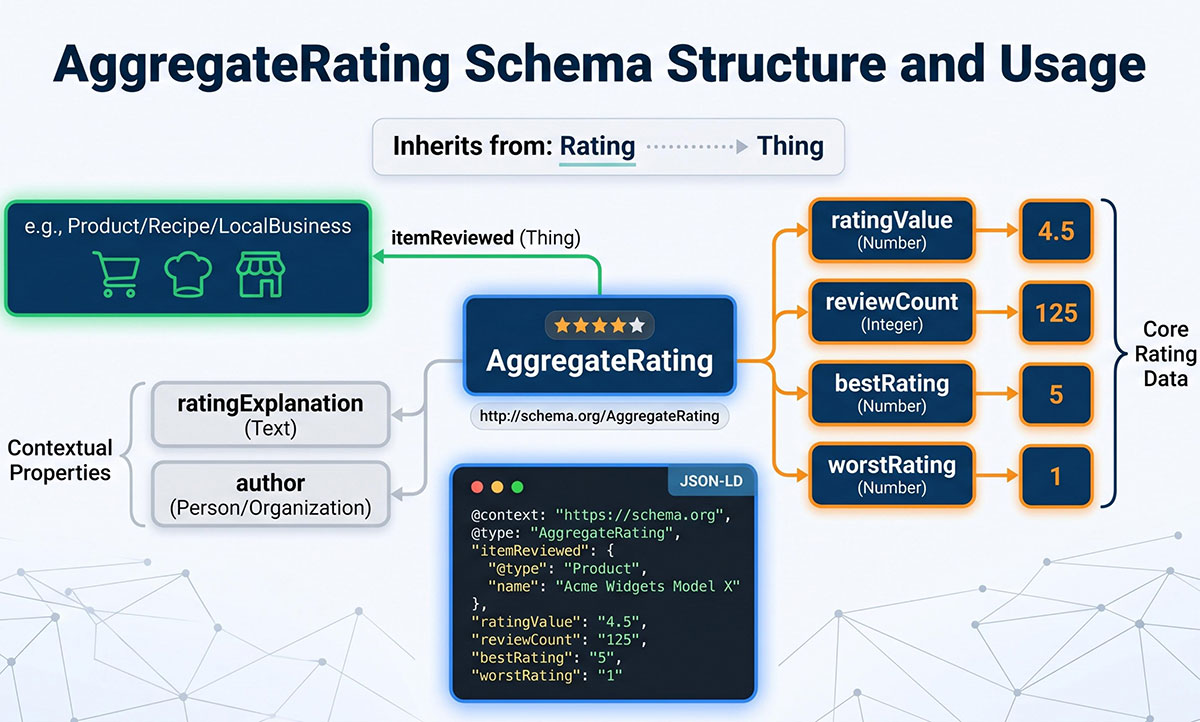
The aggregateRating schema type tells search engines that a product, service, or business has been rated by multiple people. It sits inside a broader schema type like LocalBusiness, Product, or Service, and describes the collective score across all individual reviews, not a single person’s opinion.
Google requires two properties at a minimum to consider your markup valid structured data eligible for rich snippets:
| Property | What It Does | Required |
| ratingValue | The average rating score (e.g., 4.6 out of 5) | Yes |
| ratingCount | Total number of ratings submitted | Yes |
| bestRating | The highest possible score on your scale | Recommended |
| worstRating | The lowest possible score on your scale | Recommended |
| reviewCount | Number of written reviews (vs. star-only ratings) | Optional |
Why ratingCount is the one people miss
Most WordPress sites that already have schema markup in place include ratingValue without a problem. The average rating is easy to pull from a review widget or plugin. But ratingCount gets skipped, either because it wasn’t included in the original setup, or because the developer didn’t realize it was required for Google rich results to fire.
Without ratingCount, Google has no way to verify how many people contributed to that average. A 4.9-star rating based on three internal scores looks very different to a search engine than one based on 300 verified reviews. Without the count, Google simply won’t display the stars in search results.
This is also where privacy becomes relevant. Many sites pull review data from a third-party platform. You need the count, not the individual reviews, comments, or names. Adding structured data that exposes user-generated content or personal information can put you outside Google’s content guidelines. We’ll cover exactly how to pull just the count in a later section.
One more thing worth knowing: aggregateRating is not the same as a Review schema type. A Review schema marks up a single review written by one person. aggregateRating represents the summary across all of them. Mixing these up is one of the more common structured data implementation errors that causes rich snippets to fail.
If your WordPress SEO setup is already in place, you’re closer than you think. The fix is usually just adding the missing required properties to your existing JSON-LD code.
JSON-LD, Microdata, or RDFa: Which format wins?

There are three ways to add structured data markup to your web pages. Each works technically, but they’re not equal in practice.
JSON-LD (recommended)
JSON-LD format keeps your structured data separate from your HTML content. It lives in a <script type=”application/ld+json”> tag, either in the <head> or <body> of your page, and doesn’t require you to wrap individual HTML elements with attributes.
Google recommends JSON-LD as the preferred format, and for good reason. It’s cleaner, easier to update, and doesn’t break if your page layout changes. You can add, edit, or remove schema markup without touching your visible page content at all. For WordPress sites, this is almost always the right call.
A basic aggregateRating block in JSON-LD format looks like this:
<script type="application/ld+json">
{
  "@context": "https://schema.org",
  "@type": "LocalBusiness",
  "name": "Your Business Name",
  "aggregateRating": {
    "@type": "AggregateRating",
    "ratingValue": "4.8",
    "ratingCount": "214",
    "bestRating": "5",
    "worstRating": "1"
  }
}
</script>
Replace LocalBusiness with the schema type that matches your site. For eCommerce, that would be Product. For a service business, Service or ProfessionalService, depending on context.
Microdata
Microdata is embedded directly inside your HTML elements using attributes like itemprop, itemscope, and itemtype. It’s tightly coupled to your page structure, which makes it harder to maintain. If your theme changes, your structured data can break silently.
It works, and search engines support it, but it’s more fragile than JSON-LD and harder to validate quickly. Most developers have moved away from it for new implementations.
RDFa
RDFa operates similarly to Microdata in that it wraps around existing HTML content. It uses a different attribute syntax and is more common in specific publishing contexts. For a typical WordPress website, it adds complexity without a meaningful benefit over JSON-LD.
The short answer: Use JSON-LD. It’s what Google recommends, what Yoast SEO and other major WordPress plugins generate by default, and what gives you the cleanest separation between your structured data markup and your actual page content.
Step-by-step: Adding aggregateRating in WordPress
There are two clean approaches for adding structured data in WordPress: through your SEO plugin, or manually via a code snippet. Here’s both.
Method 1: Using Yoast SEO
Yoast SEO handles a lot of schema markup automatically, but aggregateRating requires some manual configuration depending on your setup.
- Go to your WordPress dashboard and navigate to SEO → Search Appearance
- Select the content type you want to add schema to (Pages, Posts, or a custom post type)
- In the Schema tab, set the appropriate schema type for that content
- For aggregateRating, you’ll likely need Yoast SEO Premium or a custom schema add-on to inject additional properties that aren’t auto-generated
If Yoast SEO auto-generates your organization or local business schema but doesn’t include aggregateRating by default, you can extend it using a filter in your theme’s functions.php file or a code snippets plugin.
Method 2: Using schema pro or a custom schema plugin
Schema Pro is built specifically for adding structured data markup across your WordPress site with granular control. It’s one of the cleaner options for manual implementation when you need to add reviews data that isn’t pulled automatically from WooCommerce or a built-in review system.
- Install and activate Schema Pro from your WordPress dashboard
- Go to Schema Pro → Schema → Add New
- Select Local Business or the relevant structured data type
- Set your display conditions to apply the schema to the right pages
- Fill in ratingValue, ratingCount, bestRating, and worstRating in the corresponding fields
- Save and publish
Schema Pro also supports advanced custom fields (ACF) integration, which means if your ratings are stored in custom fields, you can map them directly into your schema properties without hardcoding anything. This is particularly useful for sites that pull rating data dynamically.
Method 3: Manual JSON-LD via code snippet
This is the most direct route. It gives you full control and works regardless of which SEO plugin you use.
- Install a plugin like WPCode (formerly Insert Headers and Footers) from your WordPress dashboard
- Create a new code snippet and set the type to HTML
- Paste your complete JSON-LD code block:
<script type="application/ld+json">
{
  "@context": "https://schema.org",
  "@type": "LocalBusiness",
  "name": "Your Business Name",
  "url": "https://yoursite.com",
  "aggregateRating": {
    "@type": "AggregateRating",
    "ratingValue": "4.8",
    "ratingCount": "214",
    "bestRating": "5",
    "worstRating": "1"
  }
}
</script>- Set the snippet to load in the header of your site or on specific pages only
- Save and activate
This method gives you complete control over the generated JSON-LD code without relying on any plugin’s schema generator to produce the right output. It’s also the most transparent approach for validating structured data later, since you know exactly what’s in the markup.
A note on placement: If you already have a LocalBusiness or Organization schema block elsewhere on your site (many Yoast SEO setups generate one automatically), don’t create a duplicate. Instead, add the aggregateRating block as a nested property inside the existing schema. Duplicate schema markup for the same entity on the same page can confuse search engines and reduce the chance of rich results firing.
For sites running Elementor or custom post types with complex layouts, the WPCode method tends to be the most reliable since it sits outside the page builder’s output entirely.
Pulling rating count without exposing user data
This is the part most guides skip. If your reviews live on a third-party platform, like Google Reviews, GatherUp, Trustpilot, or a similar aggregator, you need to extract only the total count for your structured data markup. Not names. Not comments. Not individual reviews. Just the number.
Here’s why this matters: Google’s structured data guidelines are clear that your schema markup must accurately reflect real, verifiable data. If you’re pulling ratings from Google Reviews specifically, the count displayed in your markup needs to match what’s publicly visible on your Google Business Profile. Inflating the number, rounding up, or using an outdated count are all ways to fall outside compliance.
Getting the count from Google Reviews
- Log in to Google Business Profile (formerly Google My Business)
- On your dashboard, locate the Reviews section in the left navigation
- Your total review count is displayed at the top of the reviews panel, next to your average rating
- Note both numbers: the average (for ratingValue) and the total count (for ratingCount)
- Do not export individual reviews or access any comment text. You need nothing beyond these two numbers.
Getting the count from GatherUp or similar platforms
- Log in to your GatherUp account and navigate to Reports → Review Summary
- Your total rating count and average score appear at the top of the summary dashboard
- Copy those values directly into your JSON-LD code; nothing else from the platform needs to be touched
What not to include
This is where privacy compliance lives. Your aggregateRating schema should only contain:
- ratingValue (the average)
- ratingCount (the total number)
- bestRating and worstRating (the scale boundaries)
It should not include:
- Individual review text or excerpts
- Reviewer names or usernames
- Reviewer contact details or locations
- Links back to specific individual reviews
Keeping structured data to aggregate-only values means you stay aligned with both Google’s content standards and basic data privacy expectations. You get the SEO benefit of rich results in search engine results pages without surfacing any personally identifiable information.
Keeping the count current
Rating counts change over time. If you’re hardcoding the ratingCount value in your JSON-LD, set a reminder to update it monthly. A stale count that’s significantly lower than your actual review total doesn’t cause a penalty by itself, but it does underrepresent your credibility in search engine results.
For sites using Schema Pro with advanced custom fields, you can store the rating count in a custom field and map it to the schema property dynamically, which removes the need for manual updates entirely. The same approach works with ACF and a custom schema filter in your theme.
Freshy’s SEO services include structured data implementation as part of broader optimization work, which means this kind of ongoing accuracy gets handled without you needing to track it manually.
Validating and going live

You’ve added your structured data markup. Before it does anything useful in search results, you need to confirm it’s valid and push it somewhere Google can actually find it.
Step 1: Test with Google’s rich results test
Google’s Rich Results Test is the most direct way to check whether your new markup is recognized correctly.
- Go to search.google.com/test/rich-results
- Enter your page URL, or simply paste your JSON-LD code directly into the code input
- Run the test and look for the aggregateRating block in the results
- Confirm that both ratingValue and ratingCount appear without errors
- Check that no warnings flag missing required properties
A green result with no errors means your structured data is valid and eligible for rich snippets. A warning (yellow) usually means a recommended property is missing, like bestRating, but won’t block rich results entirely. An error (red) means something in the markup is broken and needs fixing before Google can use it.
Step 2: Cross-check with a schema markup validator
The Rich Results Test focuses on Google-specific eligibility. For a broader check across schema.org standards, run your JSON-LD code through the Schema Markup Validator at validator.schema.org.
This schema markup validator will flag structural issues that the Rich Results Test might not catch, like incorrect nesting, missing context declarations, or schema type mismatches. It’s a useful second pass, especially if you’ve built a custom schema or nested aggregateRating inside a more complex markup block.
Step 3: Submit your sitemap to Google Search Console
Valid structured data only earns rich results after Google crawls and indexes the updated page. To speed this up:
- Log in to Google Search Console and select your property
- Navigate to Sitemaps and confirm your sitemap is submitted and current
- Go to URL Inspection and enter the specific page URL where you added the markup
- Click Request Indexing to prompt Google to recrawl that page
Google Search Console will also start surfacing your review snippets data under Enhancements → Review Snippets once it detects valid aggregateRating markup across your site. This is where you’ll see how many pages have valid structured data, how many have errors, and whether any pages are flagged for issues.
Check this section weekly in the days following your implementation. If errors appear, Google Search Console provides enough detail to diagnose what’s wrong without needing to re-test each page manually.
Step 4: Monitor for rich result eligibility
Getting valid structured data live is step one. Seeing star ratings appear in search results is step two, and it’s not instant. Google typically takes days to weeks to begin displaying rich results after a successful crawl, depending on your site’s crawl frequency and overall search rankings.
A few things worth monitoring in Google Search Console after launch:
- Coverage errors that might indicate the page isn’t being indexed correctly
- Rich result status under the Enhancements panel
- Click-through rate changes in the Performance report, which is where you’ll see the actual impact of star ratings appearing in search engine results
If rich results don’t appear after several weeks and your markup is valid, check that your schema type is eligible for rich snippets under Google’s current guidelines. Not every schema type triggers visual enhancements, and Google’s list of supported rich result types does change. For aggregateRating specifically, eligibility depends on the parent schema type being one that Google supports for review display, such as LocalBusiness, Product, Recipe, or Course.
The Freshy team handles structured data work like this as part of ongoing WordPress SEO support, including the monitoring piece that most site owners forget about after the initial implementation.
Win the search stars with Freshy
Adding structured data for aggregate ratings is one of those small SEO moves that quietly compounds over time. A few lines of clean JSON-LD, and your search results start working harder.
Here’s what to remember as you implement.
- Always include both ratingValue and ratingCount
- Use JSON-LD over Microdata or RDFa
- Pull review counts only, never user data
- Validate with Google’s Rich Results Test and Schema Markup Validator
- Monitor performance in Google Search Console
Structured data is one piece of a much bigger SEO puzzle. Freshy handles schema, performance, and ongoing optimization for WordPress sites. Talk to our team or explore our SEO services to see how we help sites turn rich results into real traffic.
Frequently asked questions
How to add structured data in WordPress?
Use a plugin like Yoast SEO or WPCode to add structured data in JSON-LD, the standardized format Google prefers. Manual JSON-LD via a step-by-step guide gives the cleanest control.
Is schema still relevant?
Yes. Schema markup powers featured snippets, knowledge panels, and map results. It improves search rankings, lifts click-through rates, and helps Google understand your video content, product schema, and article schema correctly.
What is an aggregate rating schema?
Aggregate rating schema is a standardized format that summarizes ratings across all reviews of a product, service, or business. It powers star ratings in search results and improves featured snippets visibility.
What is the star rating plugin for WordPress?
Schema Pro, Yoast SEO Premium, and WP Review Pro are top star rating plugins. Each adds an aggregate rating schema, recipe schema, event schema, and product schema for better performance in search.
Do I need a featured image for schema to work?
A featured image isn’t required for aggregate rating schema, but adding one with a brief description and additional details improves how your sample product or recipe schema appears in search results.
